

AI XLSForm Generator: Build Survey Forms with AI

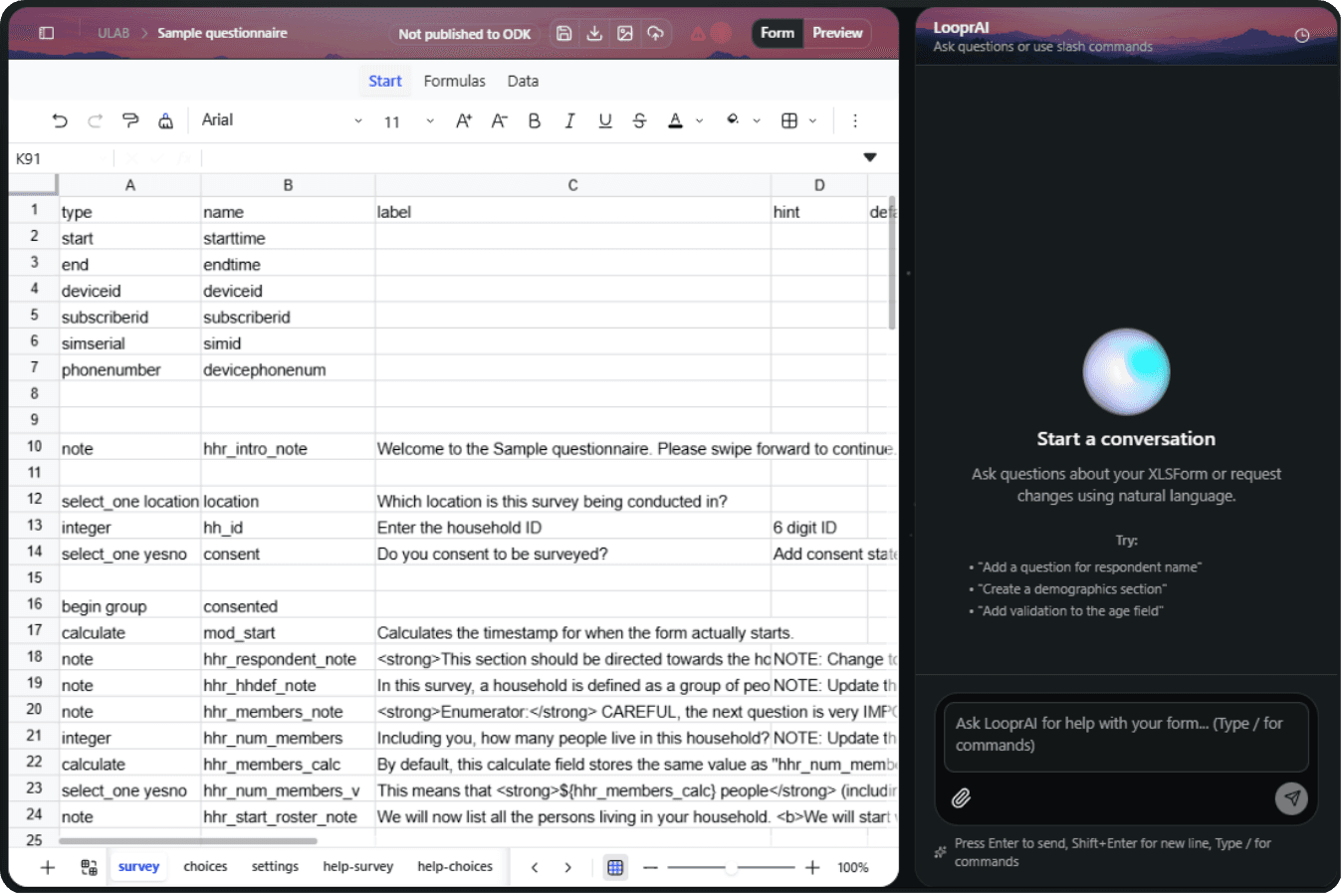
You can build an editable XLSForm by describing your survey in plain English to LooprAI, SurveyLoopr's AI form builder. LooprAI drafts the survey, choices, and settings sheets with question types, skip logic, and constraints for you to review — no XLSForm syntax memorization required.
XLSForm is the Excel-based format for designing ODK and KoboToolbox surveys. Writing it by hand means memorizing question types, relevant expressions, and constraint syntax. LooprAI removes that barrier: you describe the survey, it writes the XLSForm.
What is LooprAI?
LooprAI is an AI assistant for survey methodology and XLSForm structure. It edits a real workbook and checks it against ODK rules instead of returning a block of text you have to copy and paste (see what breaks when ChatGPT builds XLSForms). Human review and field testing remain part of the workflow.
Use the XLSForm validation checklist after the AI draft so the workbook is tested in Central and on the device used for collection.
Commands
/fixFix validation errors in your form/translateManage multi-language forms (add/remove/validate translations)/suggestGet AI suggestions for improving your form/revertRevert the latest LooprAI workbook change or a specific revision
Ask LooprAI for help with your form… (Type / for commands)
Attach a questionnaire for LooprAI to convert or reference. Only PDF, Word (.doc/.docx), and Excel (.xls/.xlsx) files are accepted — other file types are rejected automatically.
Type / to open the command menu. Selecting a command inserts it into the input so you can add details before sending.
LooprAI produces a standard XLSX workbook that you can test and manually upload to compatible platforms such as ODK Central or KoboToolbox. Platform behavior can differ, so validate on the target platform.
How to build an XLSForm with AI, step by step
Step 1: Describe your survey in plain English
In LooprAI Workspace, open a workbook and tell LooprAI what you need. For example:
Build a household food security survey. Capture household size,
monthly income, and a 9-item food insecurity scale. Add an integer
question for respondent age and a select_one for gender.
LooprAI drafts the survey, choices, and settings sheets. Review its question types, logic, and wording before use.
Step 2: Refine with follow-up instructions
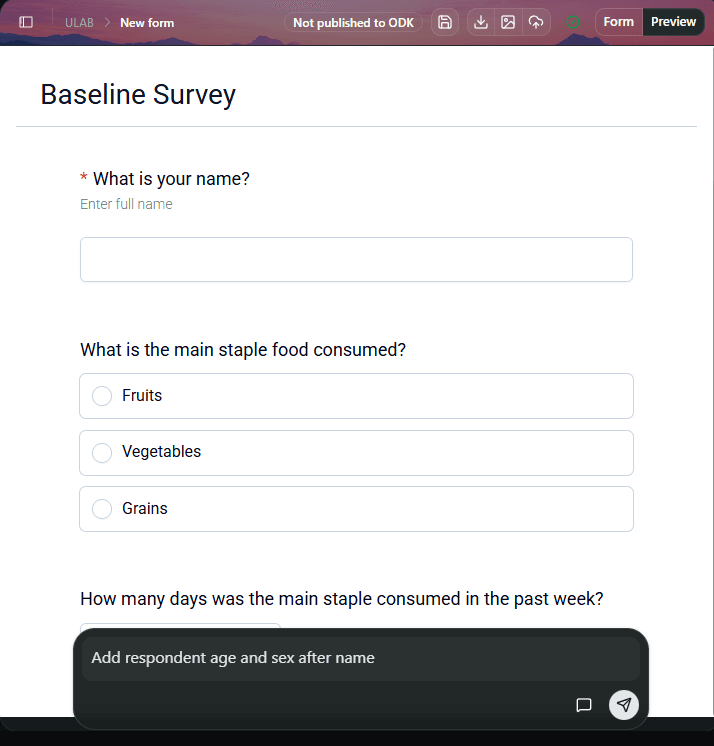
You build the form by conversation. Ask for changes in plain language and LooprAI edits the workbook in place:
- "Add skip logic so the food insecurity questions only show if the household reported running out of food."
- "Make age required and constrain it between 18 and 99."
- "Add audit logging with GPS and change tracking."
- "Add machine translations for supported survey text in French and Swahili."
Be specific about skip logic and constraints. "Only ask about livestock if the household owns land" gives LooprAI everything it needs to write the correct relevant expression.
Step 3: Validate before you publish
LooprAI checks your XLSForm against ODK's rules and highlights errors — a missing choice list, an invalid calculate, or a broken relevant reference. It can attempt guided repairs before you review and validate again.
1 error
Error 1:
ODK Validate Errors: >> XForm is invalid. : Encountered a problem with display condition for node [${schoolage_inschool}] at line: selected( ../../hhr_current_school , '1', Mismatched brackets or parentheses The following files failed validation: ${tmpcqfcgk13} Result: Invalid
Validation catches many rule errors, but it does not guarantee field readiness or correct survey logic. Preview the form and test representative submissions before fieldwork.
Step 4: Publish to SurveyLoopr-hosted ODK Central
After review and testing, publish it to your SurveyLoopr-hosted ODK Central server. Direct publishing is limited to SurveyLoopr-hosted ODK Central; use the downloaded XLSX elsewhere. If you need a paper backup or review copy, you can also convert the XLSForm to PDF.
What can AI add to your XLSForm?
LooprAI handles the parts of XLSForm that are slowest and most error-prone by hand:
| Task | What LooprAI does |
|---|---|
| Skip logic | Writes relevant expressions from a plain-English rule |
| Validation | Adds constraint and constraint_message for valid ranges |
| Translations | Machine-translates selected survey text columns in 27 supported languages; it does not translate every choice label |
| Audit logging | Inserts the audit row for data-quality monitoring |
| Document import | Builds an editable XLSForm from a PDF, DOCX, or XLSX questionnaire |
If you already have a paper or Word questionnaire, see How to Convert a Questionnaire with LooprAI.
Build my first form free"Our enumerator team needed a 120-question survey in three languages by Friday. LooprAI built the workbook and machine-translated supported survey text in an afternoon — work that used to take us a week of Excel."
— Mehrab Ali, SurveyLoopr
See LooprAI Workspace →
Frequently Asked Questions
How do you build an XLSForm with AI?
Describe your survey in plain English to LooprAI in SurveyLoopr Workspace. It drafts the survey, choices, and settings sheets, then lets you refine skip logic, constraints, and supported translations by conversation. Review, validate, preview, and test the form before publishing.
Can AI generate XLSForm skip logic and constraints?
Yes. LooprAI can write relevant expressions for skip logic and constraint rules from plain-English instructions. Review the generated expressions against the intended questionnaire logic, then validate and test the resulting form before fieldwork.
How is LooprAI different from using ChatGPT for XLSForms?
LooprAI edits a real workbook instead of returning text to copy. It checks the workbook against ODK rules and can publish directly to SurveyLoopr-hosted ODK Central. For another compatible platform, download the XLSX, upload it manually, and test it there.
Does the AI-generated XLSForm work with KoboToolbox?
LooprAI downloads a standard XLSX XLSForm that you can upload manually to KoboToolbox or another compatible platform. Test the workbook on the target platform because supported XLSForm features and behavior can differ. Direct publishing is only to SurveyLoopr-hosted ODK Central.
Can I edit the AI-generated form manually?
Yes. LooprAI generates a normal XLSForm workbook you can edit directly or keep refining by conversation. Manual edits and AI instructions work together, so you stay in full control of the final form.
No Credit Card Required
Build the form first. Add hosting when you need it.
Start free with LooprAI, then deploy a managed ODK Central server or run DataSnap checks when your project is ready.
Automation handles the mechanical work.
Researchers decide what the evidence means.