

What Is XLSForm? Format, Sheets & Example Explained

XLSForm is a form standard that lets you build complex survey forms in a simple Excel spreadsheet. You define each question as a row and control its behavior with columns, then convert the spreadsheet into a digital form for ODK, KoboToolbox, or SurveyCTO.
Already have a workbook? Check an XLSForm in your browser for common structure and logic issues before field testing.
XLSForm exists because building digital survey logic by hand is hard. Instead of writing XML, you fill in a spreadsheet — and the XLSForm tooling turns it into a working mobile form with skip logic, validation, and multiple languages.
How does XLSForm work?
An XLSForm is an Excel workbook (.xlsx) with up to three sheets. Each sheet has a specific job:
| Sheet | What it defines |
|---|---|
| survey | Every question, its type, and its logic (the form itself) |
| choices | The answer options for multiple-choice questions |
| settings | Form-level options like the title, form ID, and default language |
The survey sheet is the core. Each row is one question; each column controls one property of that question.
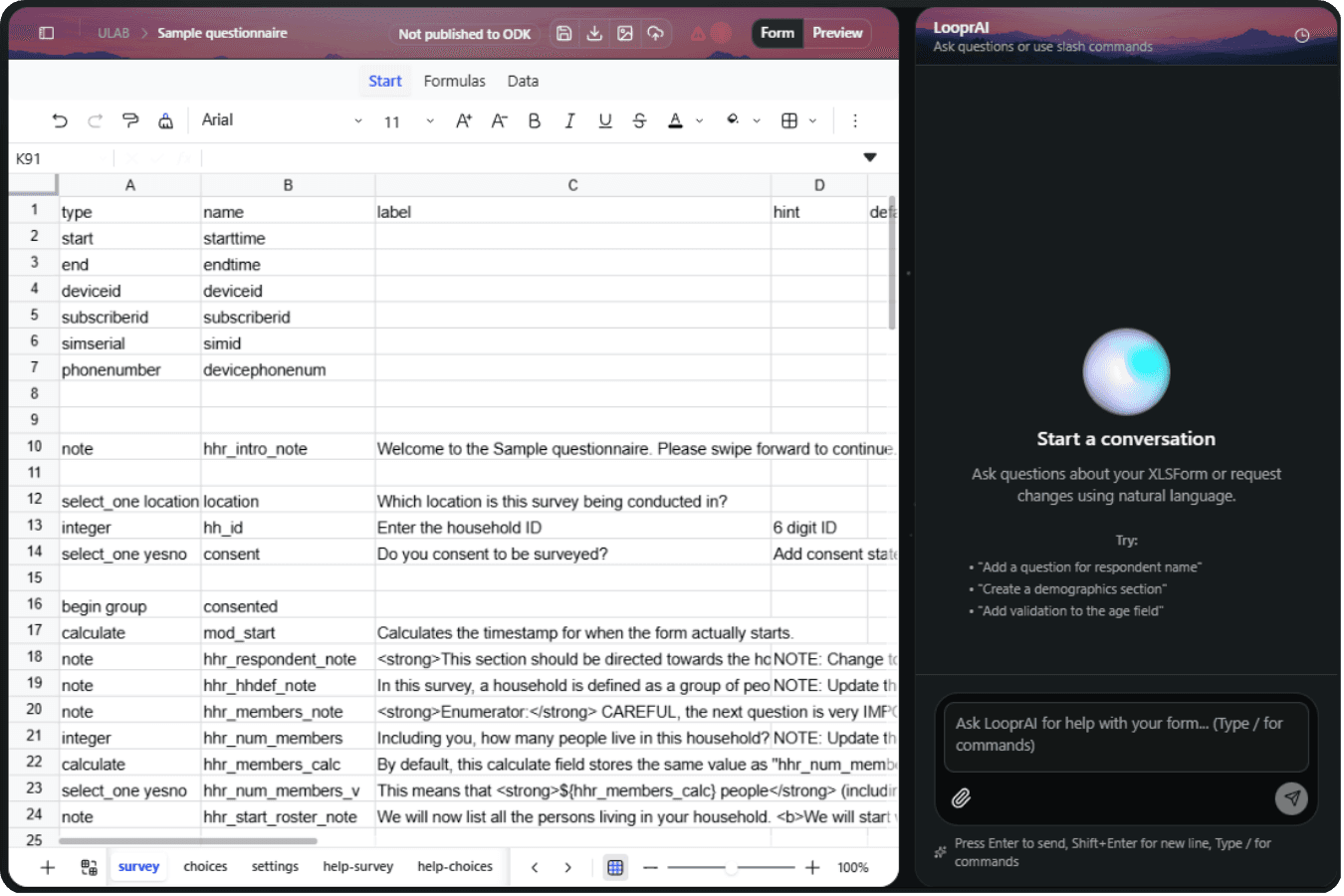
A minimal XLSForm example
survey sheet:
type              name      label
text              name      What is your name?
integer           age       How old are you?
select_one yesno  consent   Do you consent to this interview?

choices sheet:
list_name   name   label
yesno       yes    Yes
yesno       no     No
This tiny spreadsheet becomes a three-question mobile form that runs on any XLSForm-compatible app.
What can you build with XLSForm?
XLSForm covers far more than simple questions. The standard supports:
- Many question types — text, integer, decimal, date, GPS, photo, audio, barcode, and signature.
- Skip logic — show or hide questions based on earlier answers using the
relevantcolumn. - Validation — restrict answers to valid ranges with the
constraintcolumn. - Calculations — compute values automatically with the
calculatetype. - Multiple languages — add
label::English,label::French, and more for translated forms. - Repeats — collect repeating data, like a row per household member.
Which platforms use XLSForm?
XLSForm is a shared standard, so one spreadsheet works across the ecosystem:
- ODK (Collect + Central)
- KoboToolbox
- SurveyCTO
- Ona and Enketo
Because they all read the same format, you can move an XLSForm between platforms with little or no rework. To compare the two most popular, see ODK vs KoboToolbox. If you plan to publish through ODK Central, the ODK hosting guide explains the server side of that workflow.
You don't have to memorize XLSForm syntax. With LooprAI you describe your survey in plain English and it writes the survey, choices, and settings sheets for you — correctly formatted and validated.
XLSForm reference by topic
Each column and question type has its own rules. These guides cover the ones that generate the most errors, with working examples you can paste into a workbook:
| Topic | Guide |
|---|---|
| Question types and when to use each | XLSForm question types |
Showing and hiding questions (relevant) | XLSForm skip logic |
Restricting answers (constraint) | XLSForm constraint examples |
Computed values (calculate) | XLSForm calculations |
| Repeating sections, e.g. household rosters | XLSForm repeat groups |
| Region → district → village dropdowns | XLSForm cascading selects |
| Controlling how questions display | XLSForm appearance |
| Capturing location | XLSForm GPS and geopoint |
| Translating a form | Add languages in ODK |
| Fixing errors before deployment | Common XLSForm errors |
Before any form goes to the field, run it through the XLSForm validation checklist and the browser-based quick check.
Do you have to write XLSForm by hand?
No. You can describe a survey in plain English and let AI generate the XLSForm. LooprAI builds the full workbook — including skip logic, constraints, and translations — then validates it against ODK rules before you publish. See How to Build an XLSForm with AI.
If you also need a printable paper backup or ethics-review copy, see How to Convert XLSForm to PDF.
Build my first form free"XLSForm made advanced survey logic accessible to non-programmers. AI form building is the next step — now you don't even need to learn the spreadsheet."
— Mehrab Ali, SurveyLoopr
Next: How to Build an XLSForm with AI →
Frequently Asked Questions
What is XLSForm?
XLSForm is a standard for authoring survey forms in an Excel spreadsheet. You define questions as rows and their behavior as columns, then convert the spreadsheet into a digital form for platforms like ODK, KoboToolbox, and SurveyCTO.
What are the three sheets in an XLSForm?
An XLSForm has a survey sheet that defines every question and its logic, a choices sheet that lists the options for multiple-choice questions, and a settings sheet that holds form-level options like the title, form ID, and default language.
What platforms use XLSForm?
ODK, KoboToolbox, SurveyCTO, Ona, and Enketo all use the XLSForm standard. Because they read the same format, you can move a single XLSForm between these platforms with little or no rework.
Is XLSForm the same as ODK?
No. XLSForm is the file format for designing forms; ODK is a platform that collects data using those forms. ODK reads XLSForm, but so do KoboToolbox and SurveyCTO. XLSForm is the shared language; ODK is one tool that speaks it.
Do I need to know how to code to use XLSForm?
No. XLSForm was designed so non-programmers can build complex forms in a spreadsheet instead of writing code. With an AI form builder like LooprAI, you can skip the spreadsheet entirely and describe your survey in plain English.
No Credit Card Required
Build the form first. Add hosting when you need it.
Start free with LooprAI, then deploy a managed ODK Central server or run DataSnap checks when your project is ready.
Automation handles the mechanical work.
Researchers decide what the evidence means.