

ODK Audit Log: What It Tracks and How to Read It

The ODK audit log is a CSV of events ODK Collect records during an interview, including question visits and timing. With the relevant parameters enabled, it can also record answer changes, user identity, and periodic device locations.
Most teams export their submission data and never touch the audit log. That is a mistake. The submission file shows you what was answered; the audit log shows you how it was collected, helping teams investigate patterns that may reflect fabrication, coaching, or rushing.
For a wider before, during, and after fieldwork checklist, use the ODK Field Data Quality Toolkit.
What does the ODK audit log track?
The audit log captures the metadata behind every submission. Each row is a timestamped event from a single interview.
| Data point | What it records |
|---|---|
| Question visit times | When the enumerator opened and left each question |
| Answer changes | Recorded edits with old and new values when track-changes=true |
| GPS coordinates | Device location during the interview (when location tracking is on) |
| User identity | The ODK username of the enumerator (when identify-user=true) |
| Event sequence | The order in which questions and screens were navigated |
| Form lifecycle | When the form was started, saved, finalized, and submitted |
These events support review of interview duration, time per question, recorded edits, navigation, and the available location trail.
How do I enable the ODK audit log?
Add a single row of type audit to the survey sheet of your XLSForm. The minimum configuration records timing and basic events:
| type | name |
|---|---|
| audit | audit |
For full data-quality analysis, enable change tracking, user identity, and GPS:
| type | name | parameters |
|---|---|---|
| audit | audit | track-changes=true identify-user=true location-priority=balanced location-min-interval=60 location-max-age=120 |
The fastest way to add this is inside LooprAI Workspace — ask it to "add audit logging with GPS and change tracking" and it inserts the row for you.
The audit log cannot be added retroactively. It only records submissions collected after the audit row is deployed. Enable it before your first real interview, not after.
Audit log parameters explained
| Parameter | What it does | Recommended value |
|---|---|---|
track-changes | Records every answer edit | true |
identify-user | Stores the enumerator's ODK username | true |
location-priority | Balances GPS accuracy against battery | balanced |
location-min-interval | Minimum seconds between GPS readings | 60 |
location-max-age | Maximum age of an accepted GPS fix (seconds) | 120 |
For multi-hour interviews in remote areas, switch to location-priority=no-power to protect device battery. For short urban interviews, balanced gives the best location accuracy.
How to read and analyze the ODK audit log
Step 1: Export the audit log from ODK Central
In ODK Central, open your form's Submissions tab, click Download → All data, and choose CSV. ODK Central produces two files: submissions.csv for the answers and audit.csv for the audit events. Download both.
Step 2: Analyze it with DataSnap
Reading raw audit events in a spreadsheet is slow and error-prone — a single day of fieldwork can produce tens of thousands of event rows. DataSnap reports turn one ODK audit-log CSV into evidence a study team can review.
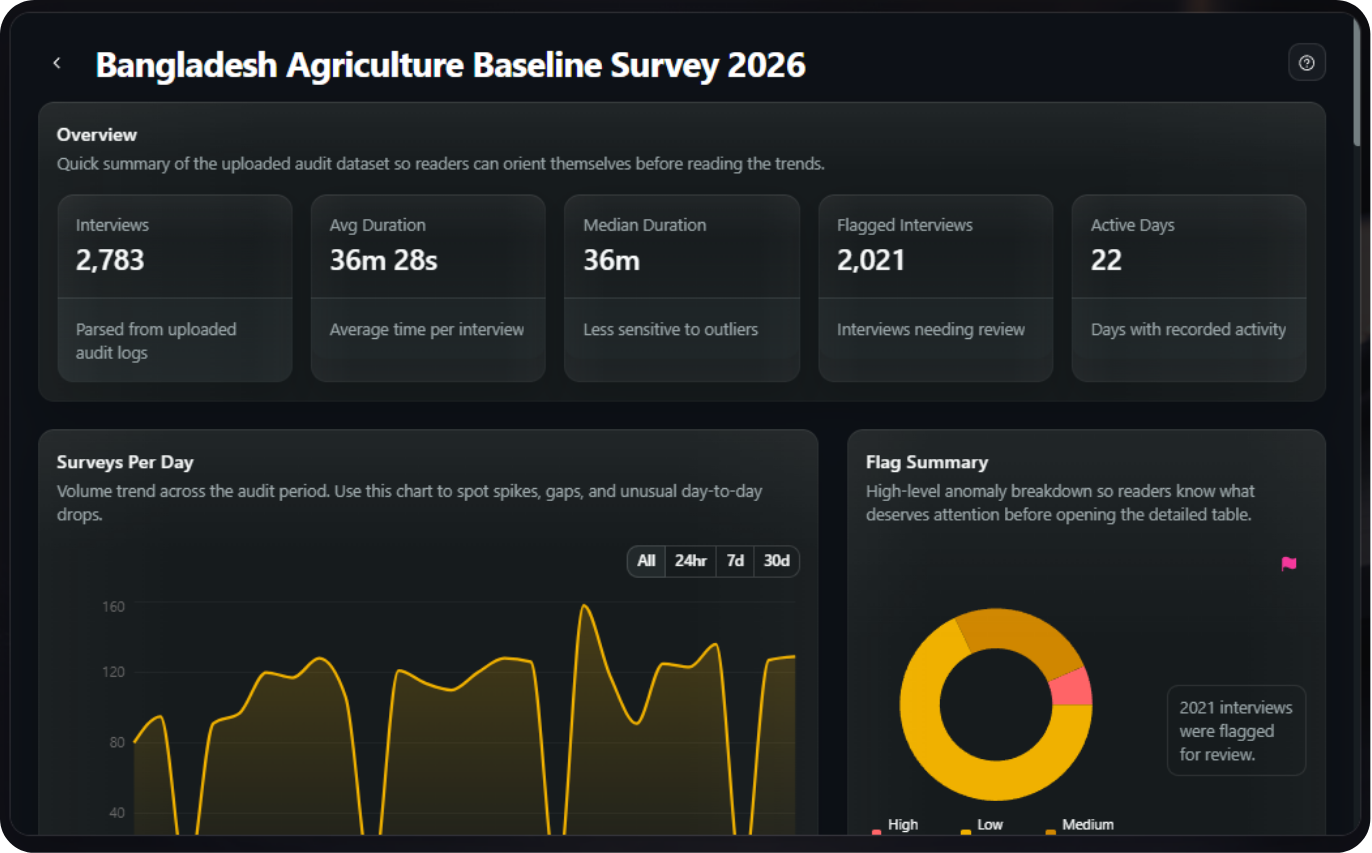
Current DataSnap reports render only the views supported by the available source evidence:
- Overview — total interviews, average and median duration, flagged interviews, and active days.
- Activity and time use — surveys per day, a daily time-use heatmap, and time by an available group or variable.
- Question and interview review — question friction, flagged interviews, and interview details.
- Survey concentration map — GPS concentration can be a pattern worth reviewing when the source contains usable location evidence.
For the full upload walkthrough, see How to Analyze Audit Log Data and Creating a DataSnap Report.
What can teams investigate from ODK audit data?
ODK can record identity, timing, answer changes, navigation, and location events when configured. Those source events can support the following investigation questions, but they are not automatic DataSnap findings or verdicts:
- Curbstoning — clustered GPS and unusually short durations can be patterns worth verifying. See How to Detect Curbstoning in Surveys.
- Coaching and back-filling — abnormally high answer-edit rates.
- Backdating — interviews logged overnight or batched into a single hour.
- Workload context — compare interview records with assignments or roster data outside DataSnap when a person-level review is needed. Current DataSnap reports do not rank enumerators.
Next: How to Detect Curbstoning →
Frequently Asked Questions
What is the ODK audit log?
The ODK audit log is a CSV of events recorded while a form is completed, including question visits and timing. With the relevant parameters enabled, it can also record answer changes, the ODK username, and periodic device locations. Add an audit row before data collection begins.
What does the ODK audit log track?
It records question visits, timing, navigation, and form lifecycle events. Optional parameters can add answer changes, an ODK username, and periodic device locations. The available evidence depends on the audit configuration used when the interview was collected, so verify audit.csv during the pilot.
How do I enable the ODK audit log?
Add a row of type audit to the survey sheet of your XLSForm. For full analysis, set parameters for track-changes, identify-user, and GPS tracking. The audit log must be enabled before data collection because it cannot be added retroactively.
How do I analyze ODK audit log data?
Export audit.csv from ODK Central, then upload it to a DataSnap report. Available views depend on the evidence recorded in the audit log. Current reports show overview, activity, time-use, question-friction, flagged-interview, interview-detail, and usable-GPS concentration views; review every surfaced pattern in study context.
Does the audit log slow down the survey or drain battery?
GPS tracking in the audit log increases battery usage and slightly increases submission size, but timing and edit tracking have minimal impact. Use location-priority=no-power for long rural interviews and balanced for short urban ones.
No Credit Card Required
Build the form first. Add hosting when you need it.
Start free with LooprAI, then deploy a managed ODK Central server or run DataSnap checks when your project is ready.
Automation handles the mechanical work.
Researchers decide what the evidence means.