GPS concentration
Review locations where submissions are unusually concentrated when the source contains usable location evidence.
See what an ODK audit log records
ODK audit-log analysis
DataSnap turns one ODK audit-log CSV into a fieldwork quality report. It highlights GPS concentration, unusual timing and activity patterns, question friction, and work patterns so teams decide what to investigate. Create one report free, review evidence with people who know the study, then share findings through a configured link.
Verified July 18, 2026
No credit card required.
Report evidence
Review locations where submissions are unusually concentrated when the source contains usable location evidence.
See what an ODK audit log recordsInspect unusual timing and report flags that suggest an interview or workflow deserves a closer look.
Read the audit-log analysis guideSee where question flow or duration patterns may warrant a form, training, or field-process review.
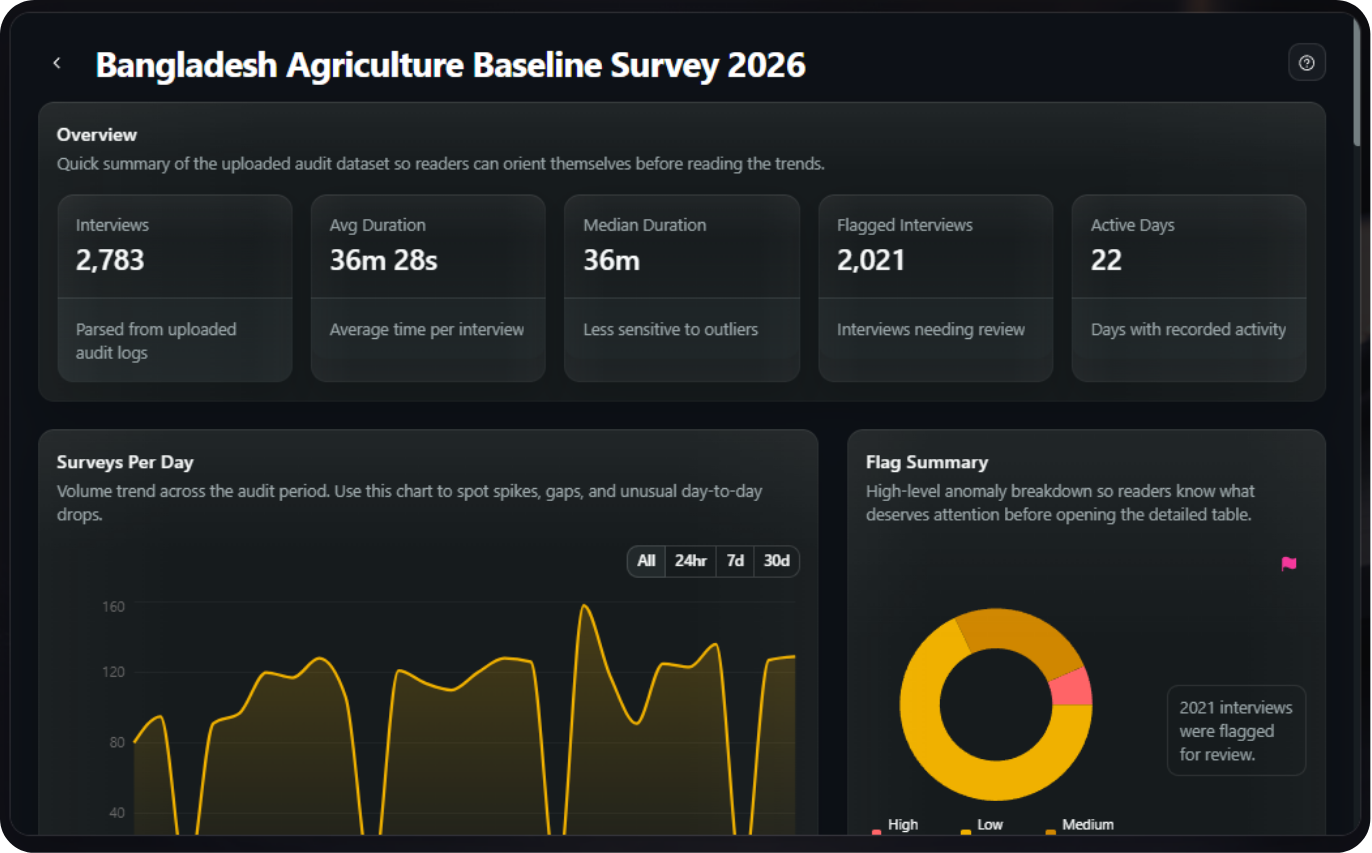
Review interview counts, active days, daily time-use patterns, and time grouped by available report variables.
Review responsible fieldwork monitoringDataSnap highlights patterns to investigate. It does not decide that an interview, enumerator, or dataset is fraudulent.
Human review and data boundaries
Audit.csv to a team decision
Upload one ODK audit-log CSV file (audit.csv) from the relevant submission workflow.
Inspect GPS concentration, timing and activity patterns, question friction, and work patterns in a report.
Discuss evidence with the study team, investigate the context, and share a configured report link with stakeholders when appropriate.
Two source paths
Create a report by uploading one ODK audit-log CSV. This is the free, direct starting point.
For an accessible, running SurveyLoopr-hosted server, create a connected report using the available server, project, and form flow. Use CSV upload when that connection is unavailable.
Start free, add capacity when needed
Free
One DataSnap report
No credit card required.
Analyze an audit log freeWorkspace Pro
or $529/year
Unlimited DataSnap reports
Upgrade to Workspace ProCreate a report-specific share link when you need to show findings to a stakeholder. Recipients can view the shared report without receiving a SurveyLoopr account or permission to change your reports. The owner controls the link's configured availability and expiry.
DataSnap is SurveyLoopr's ODK audit-log reporting tool. Upload one audit-log CSV to create a report that helps a team review GPS concentration, unusual timing and activity patterns, question friction, and work patterns. The report supports investigation; it does not issue a fraud verdict.
Verified July 18, 2026
Upload one ODK audit-log CSV file, commonly named audit.csv, from the relevant submission workflow. DataSnap is not presented as an XLSX, PDF, or generic spreadsheet uploader. Check that the audit-log data contains the evidence needed for the report views you expect.
Verified July 18, 2026
No. DataSnap can highlight unusual patterns and report flags that may deserve investigation, but it cannot prove fraud or misconduct. Review the form configuration, field protocol, location context, and supporting evidence with people who understand the study before making a decision.
Verified July 18, 2026
DataSnap can visualize GPS concentration when usable location evidence is present in the supplied audit-log/report data. Concentrated points may be worth reviewing, but location patterns alone do not establish what happened in the field or whether a submission is valid.
Verified July 18, 2026
They are report patterns or flags that make a timing sequence, interview behavior, or audit-log record worth a closer look. They are not a scorecard or final judgment. The responsible next step is to review the relevant context with the study team.
Verified July 18, 2026
Yes. DataSnap can surface question-friction and duration-oriented patterns from the supplied audit-log evidence. Use them to ask whether a question, skip path, enumerator instruction, or field condition needs attention; do not treat one pattern as proof of a design problem.
Verified July 18, 2026
DataSnap reports show total interviews, average and median duration, flagged interviews, active days, surveys per day, daily time use, and time grouped by an available variable. These are study-level and interview-level views; DataSnap does not rank enumerators or provide a per-enumerator performance breakdown.
Verified July 18, 2026
Yes. The free SurveyLoopr workspace includes one DataSnap report and does not require a credit card. Start through signup, then use the existing DataSnap application to upload an audit-log CSV and review the resulting report before deciding whether more report capacity is needed.
Verified July 18, 2026
Workspace Pro includes unlimited DataSnap reports and costs $49 per month or $529 per year. It is the scale-up choice for teams that need more report capacity. Connected-report availability and update behavior still depend on the accessible SurveyLoopr-hosted server workflow.
Verified July 18, 2026
DataSnap supports connected reports for accessible, running SurveyLoopr-hosted ODK servers through the available server, project, and form flow. DataSnap does not connect to every ODK deployment or external platform. Use a CSV upload when that connection is unavailable.
Verified July 18, 2026
There is no promised fixed update interval. Connected reports use the available SurveyLoopr-hosted server workflow, and update behavior can depend on server access, source data, and processing. Review the report status in the application instead of relying on a marketing timing guarantee.
Verified July 18, 2026
No. DataSnap can only analyze evidence present in the supplied audit-log/report data. Missing GPS, timestamps, audit events, or other source information can limit the available views. Confirm the form's audit configuration and interpret the resulting report within those data boundaries.
Verified July 18, 2026
Use the report to prioritize questions, not to replace judgment. Discuss notable patterns with people who know the questionnaire, field protocol, geography, and enumerator assignments; verify the underlying context; then decide whether follow-up, retraining, form changes, or no action is appropriate.
Verified July 18, 2026