
ODK Field Data Quality Toolkit

ODK field data quality starts before the first interview. Use this toolkit to check the form, monitor collection, review audit evidence, and document decisions before analysis.
The checklist is a starting point for supervision. It does not decide whether an interview is valid. A short interview, an unusual GPS point, or a high edit rate is a reason to review the record and its field context.
Before fieldwork
Build the checks into the form while changes are still cheap:
- Add constraints to numeric, date, and range questions. An impossible answer should be rejected at collection time.
- Use relevant expressions for questions that do not apply to every respondent. This reduces accidental answers in hidden sections.
- Mark consent, identifiers, and other required fields explicitly.
- Add an audit row before the pilot. Audit logging cannot be added retroactively to interviews that are already complete.
- Set
identify-user=truewhen the team needs to connect interviews to enumerators. - Enable location tracking when the field protocol requires location evidence, and explain the collection protocol to enumerators.
- Test translations, repeats, calculations, media, and choice filters on the device used in the field.
- Run a complete interview in airplane mode, reconnect, submit it, and compare the exported record with the answers entered.
Use the existing XLSForm constraint examples, skip logic guide, and ODK Collect setup guide while preparing the pilot.
For a practical audit configuration, start with this row on the survey sheet:
| type | name | parameters |
|---|---|---|
| audit | audit | track-changes=true identify-user=true location-priority=balanced location-min-interval=60 location-max-age=120 |
The exact parameters depend on the study protocol, device settings, expected interview length, and battery constraints. Review them during the pilot instead of treating one configuration as universal.
During fieldwork
Review collection data on the same day when possible. A daily check gives the supervisor a chance to clarify a form question, retrain an enumerator, or repeat a small number of interviews while the field team is still available.
| Signal | Question to ask | Follow-up |
|---|---|---|
| Interview duration | Are interviews far shorter than the form and protocol allow? | Review the interview, form path, and enumerator context. |
| GPS evidence | Do recorded locations fit the sample area and visit plan? | Check accuracy, device behavior, and assignment records. |
| Submission volume | Is one enumerator submitting an unusual number of records? | Compare output with workload, dates, and travel time. |
| Answer changes | Are important answers being edited unusually often? | Review the affected records and the interview protocol. |
| Sync behavior | Are finalized forms staying on devices or failing to send? | Check app-user access, connectivity, storage, and form version. |
These signals are prompts for review, not automatic findings. Enumerator performance monitoring explains how to compare them with assignment records and field context.
After fieldwork
Before analysis, preserve the evidence and record what the team decided:
Use the ODK submission review checklist for the Central-side receipt, review-state, export, repeat, and media checks that precede this quality review.
- Export submissions and media from ODK Central.
- Keep
audit.csvwith the dataset when audit logging was enabled. - Reconcile server submissions with the sample frame and enumerator records.
- Review the most unusual duration, location, edit, and volume patterns.
- Record the reason for every excluded interview.
- Keep the original exports before applying cleaning or recoding steps.
- Note which quality checks were unavailable because the form did not collect the required evidence.
The last item matters. A report cannot recover GPS, user identity, or answer-change history that the form never recorded.
What the audit log can support
The ODK audit log records events such as question visits, timing, answer changes, user identity, navigation, and available device locations when the relevant parameters are enabled.
| Evidence | Possible investigation |
|---|---|
| Timing and interview duration | Rushed interviews, unusual pauses, or a form path that needs clarification |
| User identity | Which enumerator submitted the interview |
| GPS readings | Whether the recorded location fits the assignment and sample area |
| Answer changes | Whether key fields were edited repeatedly or late in the interview |
| Navigation events | Whether the form was completed in a way that matches the protocol |
The evidence still needs context. A weak GPS fix may reflect a device or environment problem. A short interview may be valid for a simple respondent. A high edit rate may reflect a confusing question. Document the interpretation rather than turning one signal into a verdict.
Review the evidence in DataSnap
You can analyze an exported audit.csv manually or use a DataSnap report to review the available evidence in one place. The current workflow includes overview, activity and time-use summaries, question friction, flagged interviews, interview details, and a GPS view when the source contains the required data.
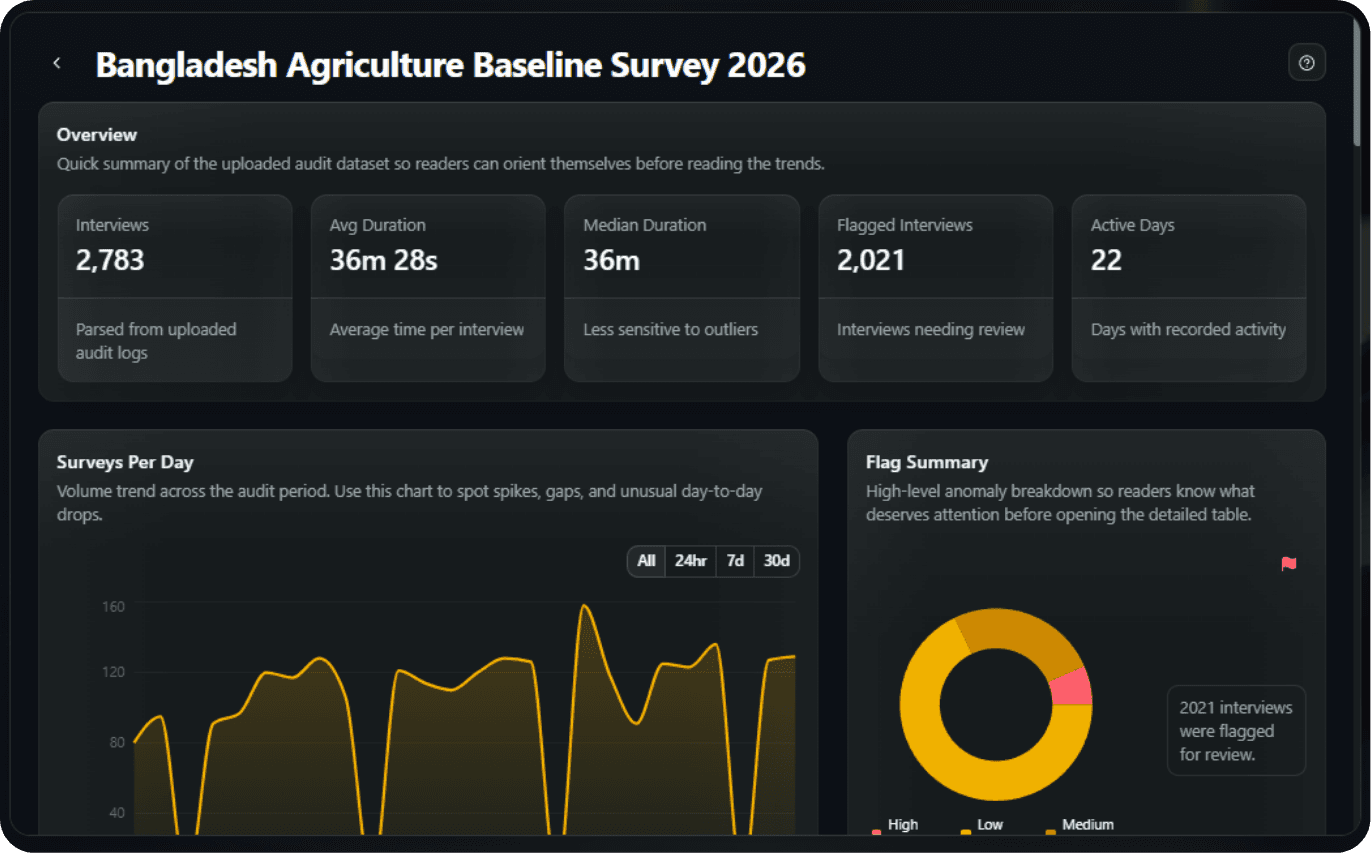
For the upload steps, see How to Analyze Audit Log Data. For specific investigations, continue to curbstoning detection, enumerator monitoring, or the survey data quality checklist.
Do not describe an interview as fabricated from one metric alone. Review the source record, the form protocol, the assignment, and the field team's explanation before taking action.
A simple supervision record
For each review, record:
- The interview or enumerator pattern that triggered review.
- The source evidence used, such as duration, GPS, audit events, or assignment records.
- The field context supplied by the supervisor or enumerator.
- The decision, including whether the record was retained, corrected, repeated, or excluded.
- The person and date responsible for the decision.
This makes the cleaning process easier to explain to a research lead, reviewer, or donor later.
Check ODK data quality for freeRead the ODK audit log guide
Frequently Asked Questions
What is the ODK field data quality toolkit?
It is a practical checklist for preparing an ODK form, monitoring interviews during collection, reviewing audit evidence, and documenting decisions before analysis. It covers validation, audit logging, timing, GPS, enumerator identity, submissions, and exports.
What should I check before collecting ODK data?
Test constraints, skip logic, required fields, translations, repeats, calculations, media, offline collection, synchronization, and exports. Enable the audit log before the first real interview when the study needs timing, GPS, identity, or answer-change evidence.
What should supervisors monitor during ODK fieldwork?
Review interview duration, GPS plausibility, submissions per enumerator, answer changes, and synchronization problems. Use these as review signals and compare them with assignments, the form protocol, and the field team's context.
Can an ODK audit log prove that an interview is fake?
No single audit signal proves fabrication. Timing, GPS, identity, navigation, and answer-change patterns can identify records that need review, but supervisors should compare the evidence with the study protocol and field context before deciding.
Can DataSnap analyze ODK audit logs?
Yes. DataSnap can review an available ODK audit-log CSV and render the supported overview, activity, time-use, question-friction, flagged-interview, interview-detail, and available-GPS views. The available views depend on the evidence collected in the source.
No Credit Card Required
Build the form first. Add hosting when you need it.
Start free with LooprAI, then deploy a managed ODK Central server or run DataSnap checks when your project is ready.
Automation handles the mechanical work.
Researchers decide what the evidence means.