

How to Monitor Enumerator Performance

Enumerator performance monitoring is the practice of reviewing each field interviewer's productivity, timing, and data quality while collection is running. The ODK audit log can record an enumerator identity when identify-user=true. Current DataSnap reports do not provide per-enumerator rankings or performance breakdowns.
Use DataSnap to review study-level activity and interview-level evidence, then compare relevant interview details with assignment or roster records when an individual follow-up is needed.
For the full fieldwork quality process, including form preparation and post-fieldwork documentation, see the ODK Field Data Quality Toolkit.
The goal is to catch problems on day one, not at endline. An enumerator whose results raise concern in week one can be reviewed and retrained if needed; waiting until fieldwork ends can make verification and corrective collection costly.
What enumerator metrics should you monitor?
Strong monitoring combines productivity, quality, assignment, and field-context evidence. The following are supervision metrics a team may calculate from its source and operational records; they are not all current DataSnap report sections.
| Metric | What it measures | Watch for |
|---|---|---|
| Interviews completed | Daily output per enumerator | Results outside the planned workload |
| Median interview duration | Time spent per interview | Durations far below the team median |
| Answer-edit rate | Share of answers changed in source audit data | Results outside the form's expected correction pattern |
| GPS coverage | Spread of interview locations | Clustering at one point requires context and review |
| Time-of-day pattern | When interviews happen | Overnight or batched timestamps suggest backdating |
| Completion rate | Finished vs abandoned forms | High abandonment signals form or training issues |
A useful supervision comparison is duration versus output. An interviewer with unusually high output and short durations is not automatically a top performer or a problem; the pattern warrants study-context review.
How to monitor enumerator performance with DataSnap
Step 1: Tag every interview with its enumerator
Enable identify-user=true in your XLSForm audit row so each submission carries the enumerator's ODK username:
| type | name | parameters |
|---|---|---|
| audit | audit | track-changes=true identify-user=true location-priority=balanced location-min-interval=60 location-max-age=120 |
Without identify-user, you can see aggregate quality but cannot attribute it to individuals. For the full parameter reference, see ODK Audit Log: What It Tracks.
Step 2: Review performance in DataSnap
Export audit.csv from ODK Central and upload it to a DataSnap report. DataSnap renders the available study-level and interview-level evidence; it does not create an enumerator leaderboard.
For the public workflow and its review limits, see DataSnap reports. These comparisons are signals for human review, not automatic conclusions; interpret them against the form, field protocol, geography, and study context.
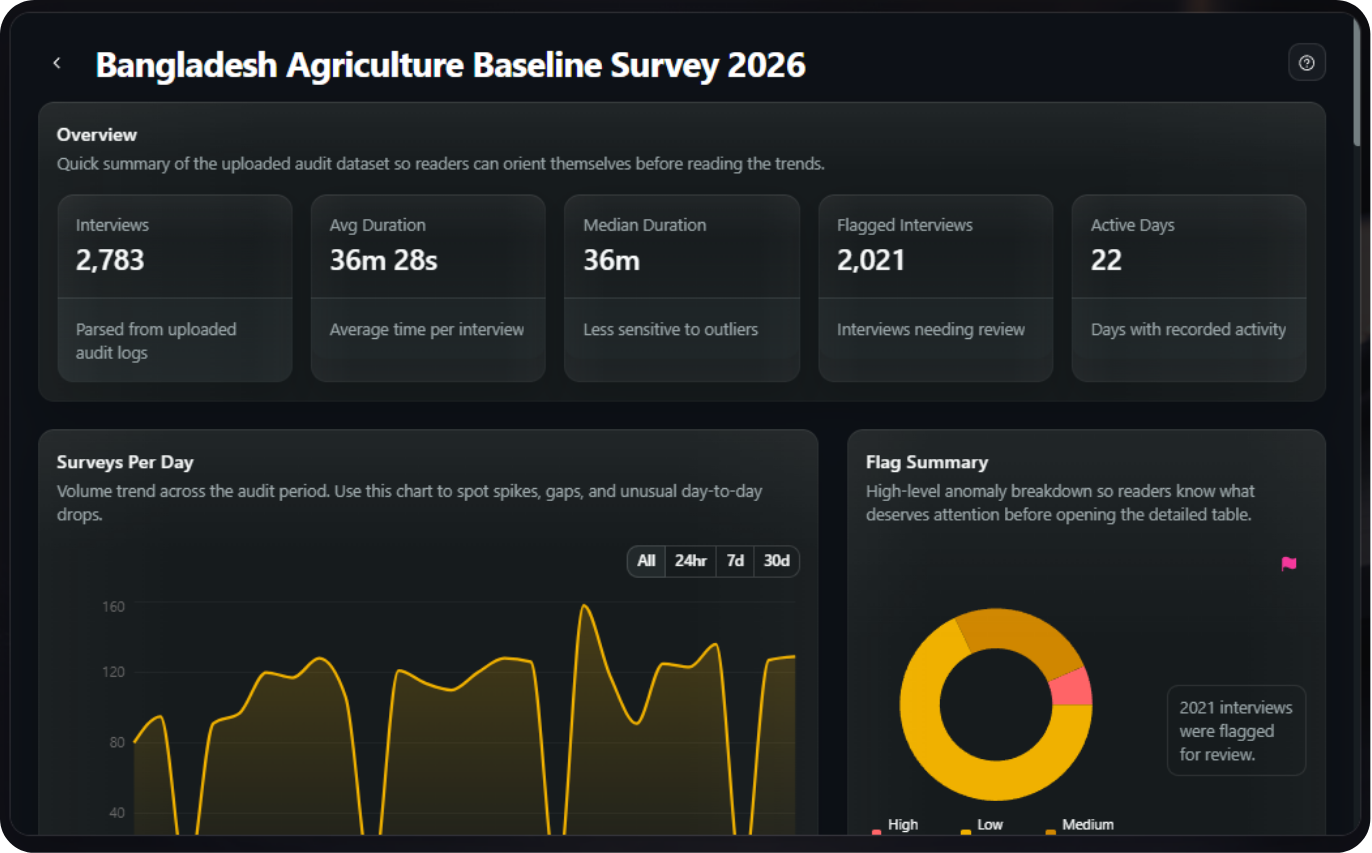
- Overview — total interviews, average and median duration, flagged interviews, and active days.
- Surveys per day — review interview volume over the collection period.
- Daily time-use heatmap — review when recorded interview activity occurred.
- Time by group or variable — summarize timing using an available report variable.
- Question friction, flagged interviews, and interview details — identify records that deserve contextual review.
- Survey concentration map — review recorded locations only when the source contains usable GPS evidence.
When an accessible SurveyLoopr-hosted ODK connection is available, use the connected report workflow instead of a manual export. DataSnap does not promise a fixed refresh interval; check report status in the application.
Turn monitoring into action
Monitoring only improves data if you close the loop with the field team:
- Define review rules up front. Document plausible interview times, workloads, locations, and escalation steps for the study.
- Review on a regular fieldwork cadence. Use the report's activity, time, question-friction, flag, and interview-detail sections to choose records for review.
- Compare with operational records. Match relevant interview details to assignments and field context before contacting an enumerator.
- Verify before acting. Back-check a sample, discuss context with supervisors, and document the evidence behind any retraining or corrective decision.
For the fraud-specific signals behind these checks, see How to Detect Curbstoning in Surveys.
Check my data quality freeNext: ODK Audit Log Explained →
Frequently Asked Questions
What is enumerator performance monitoring?
Enumerator performance monitoring reviews field interviewers' productivity, timing, and data quality during collection. ODK audit data can record identity, timing, edits, and location when configured. Combine those records with assignments and study context; current DataSnap reports do not calculate a complete per-enumerator scorecard.
Which enumerator metrics matter most?
Useful supervision metrics include interview volume, duration, source-record edit patterns, available location evidence, collection times, and completion status. Choose study-specific thresholds before fieldwork, then compare unusual results with assignments, the form, protocol, geography, device behavior, and supervisor evidence before drawing conclusions.
How do I track which enumerator collected each interview?
Set identify-user=true in the XLSForm audit row so ODK records the username in audit data. Use that source evidence and assignment records when investigating an interview. Current DataSnap reports show study-level and interview-level views but do not promise automatic per-enumerator attribution or ranking.
When should I review enumerator performance?
Review on a regular cadence while fieldwork is active so the team can verify context while it is still available. Use DataSnap to prioritize interviews and patterns, then compare them with assignments and supervisor evidence before deciding whether follow-up, retraining, form changes, or no action is appropriate.
Can DataSnap rank enumerators automatically?
No. Current DataSnap reports do not provide automatic per-enumerator rankings or performance breakdowns. They show overview, activity, time-use, question-friction, flagged-interview, interview-detail, and available GPS views. Combine relevant interview evidence with assignment or roster records for any person-level supervision decision.
No Credit Card Required
Build the form first. Add hosting when you need it.
Start free with LooprAI, then deploy a managed ODK Central server or run DataSnap checks when your project is ready.
Automation handles the mechanical work.
Researchers decide what the evidence means.