

What Is a Speaker Label in Transcription?

A speaker label is the tag attached to each line of a transcript that identifies who said it, such as "Speaker 1" or a participant's name. It is produced by a step called speaker diarization, which splits an audio recording into segments by voice before the words are assigned to each segment.
Speaker labels vs. plain transcription
Plain transcription converts audio to text as one continuous block. Speaker-labeled transcription adds a second layer of information: turn boundaries and speaker identity.
| Without speaker labels | With speaker labels |
|---|---|
| One unbroken block of text | Text broken into turns |
| No way to tell who said what | Each line attributed to a speaker |
| Hard to quote a specific participant | Quotes traceable to a person |
| Unusable for multi-person interviews | Usable for interviews, focus groups, meetings |
Single-speaker audio — a voice memo, a lecture, a solo narration — doesn't need speaker labels. Anything with two or more people talking does.
How speaker labeling works
- Voice activity detection. The system finds the stretches of audio that contain speech and discards silence and noise.
- Speaker segmentation. It groups speech segments by acoustic similarity — pitch, tone, and speaking style — to estimate how many distinct voices are present and where each one starts and stops.
- Label assignment. Each segment gets a placeholder label ("Speaker 1", "Speaker 2"). Some tools let you rename these to real names after the fact.
- Alignment with words. The transcribed words are matched to the segment they fall in, producing labeled lines instead of a flat transcript.
None of this identifies who a speaker is by name — it only tells you that segment A and segment C were probably the same voice. Naming the speaker is a separate step, done by a human or by matching against a known voice sample.
Why speaker labels break
Speaker labeling is a statistical estimate, not a lookup, so it fails in predictable ways:
- Overlapping speech. Two people talking at once gets assigned to whichever voice is louder or clearer, and the other voice can be dropped or merged in.
- Similar-sounding voices. Two speakers with close pitch and tone — common among family members or same-gender same-age groups — get merged into one label.
- One speaker split into two labels. A cough, a laugh, or a shift in tone partway through someone's turn can make the system think a new speaker started.
- Background voices. A third person entering the room, a phone call in the background, or a TV can get picked up as an extra "speaker" that doesn't belong in the interview.
Treat every speaker label as a draft, not a fact. Read the first two minutes of any labeled transcript against the audio before trusting the labels for the rest of the file — this catches merged or split speakers early, before they propagate through hours of interviews.
Why speaker labels matter for qualitative transcription
Qualitative transcription is the process of turning recorded interviews, focus groups, and field conversations into text for research analysis — coding, thematic comparison, and quotation. Speaker labels are what make that process attributable.
Without a reliable speaker label, a researcher cannot:
- Separate the interviewer's questions from the participant's answers during coding
- Attribute a quotation to a specific participant in a report
- Compare how different speakers in a focus group respond to the same question
- Track a single participant's perspective across a long, multi-topic interview
This is different from transcribing a meeting or a podcast, where a wrong speaker label mostly costs readability. In transcription qualitative research work, a wrong speaker label can misattribute a finding to the wrong person — a problem that surfaces much later, when a reviewer or co-author tries to trace a quote back to its source.
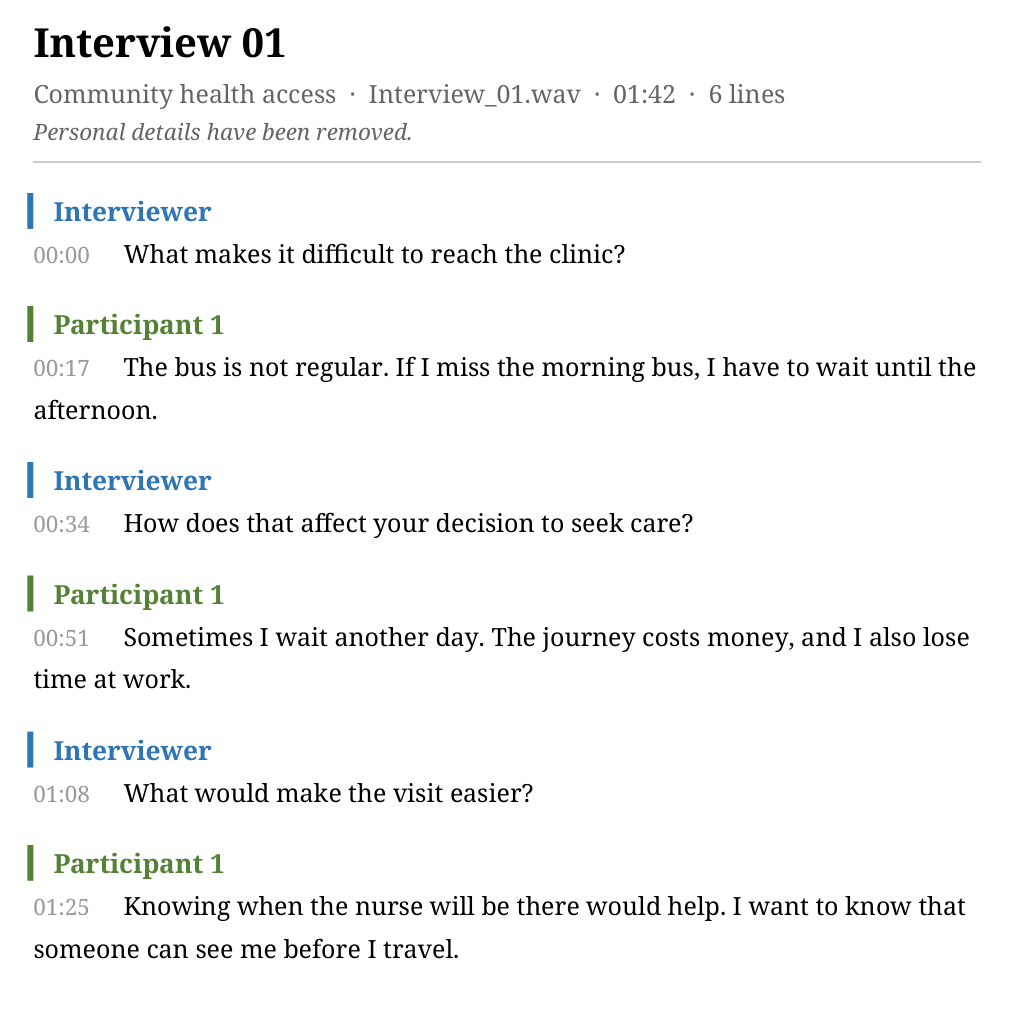
How to fix mislabeled speakers in a research transcript
- Play the audio while reading the transcript, not after. Catching a mislabel on first pass is faster than re-listening to find where it started.
- Rename placeholder labels to roles or pseudonyms ("Interviewer", "P03") as soon as you confirm them, so later passes read faster.
- Watch turn boundaries near overlapping speech and long pauses — these are where segments most often get merged or split.
- Correct one error at a time and keep listening — a single mislabeled segment can shift how the next few lines are attributed if the tool re-groups nearby segments.
- Note unresolved cases instead of guessing. If two voices are genuinely indistinguishable in the audio, mark the line as uncertain rather than assigning a label you're not confident in.
SurveyLoopr's approach to speaker labels
SurveyLoopr's transcription workspace returns speaker-labeled, timestamped transcripts for interview and focus-group recordings, then keeps the audio, text, and speaker controls in the same view so a researcher can correct a label without losing their place. Renaming a speaker, replaying a segment, and fixing a word all happen in one workflow instead of switching between an audio player and a document.
This matters most on field recordings, where accents, background noise, and code-switching make automatic speaker segmentation less reliable than it looks on a clean studio demo. Review is part of the workflow, not an afterthought — see the research interview transcription guide for the full reviewable process, from upload to analysis-ready transcript.
Frequently Asked Questions
What is a speaker label in transcription?
A speaker label is a tag on each transcript line identifying who spoke it, such as 'Speaker 1' or a participant's name. It comes from speaker diarization, which segments audio by voice before matching transcribed words to each segment.
What is the difference between speaker labeling and speaker diarization?
Speaker diarization is the technical process of splitting audio into segments by voice. Speaker labeling is the visible result: the tags attached to transcript lines. Diarization happens first; labeling is how its output is displayed.
Why do speaker labels matter in qualitative transcription?
Qualitative transcription needs attributable turns so researchers can separate interviewer questions from participant answers, quote a specific speaker, and compare responses across a focus group. Without reliable labels, coding and quotation both become unreliable.
Can speaker labels be wrong in a transcript?
Yes. Overlapping speech, similar-sounding voices, coughs or tone shifts mid-turn, and background voices can all cause a system to merge two speakers into one label or split one speaker into two. Labels should be reviewed against the audio, not trusted automatically.
How do I fix mislabeled speakers in a transcript?
Play the audio while reading, rename placeholder labels to roles or pseudonyms as you confirm them, watch turn boundaries near overlap and pauses, and correct one error at a time so you can catch related errors nearby before moving on.
Does SurveyLoopr add speaker labels to research interviews?
Yes. SurveyLoopr returns speaker-labeled, timestamped transcripts for interview and focus-group recordings, and keeps audio, text, and speaker controls together so researchers can rename speakers and correct labels without losing their place.
No Credit Card Required
Build the form first. Add hosting when you need it.
Start free with LooprAI, then deploy a managed ODK Central server or run DataSnap checks when your project is ready.
Automation handles the mechanical work.
Researchers decide what the evidence means.