

Getting Started with SurveyLoopr

SurveyLoopr is a managed platform for field survey teams. ODK Central deployment typically takes about 2–5 minutes, but image availability and DNS can take longer. The same dashboard provides an AI-powered XLSForm workspace and DataSnap data-quality reports.
No Linux knowledge. No server administration. No DevOps team required.
What you'll need
- An email address to create your account
- Roughly 10 minutes for this guide
Step 1: Create your account
Go to surveyloopr.com/signup and enter your email address and a password.
You'll receive a confirmation email. Click the link inside to activate your account.
If you don't see the confirmation email within 2 minutes, check your spam folder. The email comes from [email protected].
After confirming, you're taken directly to your dashboard.
Step 2: Explore the dashboard
The dashboard is your command center. It shows four key metrics at a glance:
| Metric | What it means |
|---|---|
| Active Servers | ODK Central servers currently running |
| Forms | XLSForm workbooks in your workspace |
| DataSnap Reports | Data quality reports you've created |
| Recent Activity | Actions taken in the last 30 days |
Below the metrics, you'll find quick-access cards for creating a server, starting an AI form, or opening a DataSnap report.
Step 3: Understand the three core tools
SurveyLoopr has three product areas:
ODK Servers
A managed ODK Central instance — the industry-standard platform for mobile data collection. You deploy one with a name, choose a plan, and SurveyLoopr handles the rest: server provisioning, SSL, DNS, and maintenance.
SurveyLoopr server plans do not limit submissions, forms, or users. Server capacity is the practical limit, so you can start with a smaller server and resize later when the workload grows.
For the broader hosting decision — self-hosted ODK Central versus managed ODK hosting — see the ODK hosting guide.
If you are new to ODK, start with ODK Central Basics for the intro videos, official ODK learning links, and a high-level overview of Central, Collect, forms, users, and submissions.
Learn how to deploy your hosted server in the Getting a Server guide.
Server customization
PNG logo with transparent background, 150x150px minimum

arced-int.png uploaded
Drag a new image here or upload file.
Vertical image, 4:5 crop recommended

Login.jpg uploaded
Drag a new image here or upload file.
A title for your server login.
Instructions or a short welcome message.
Choose a preset color theme for ODK Central.
ARCED International
Sign in to continue to your workspace.
"I used to spend days setting up ODK Central for each project. SurveyLoopr made it a 2-minute task."
— Bedar, Solutions of Things Lab
LooprAI Workspace
An AI-powered XLSForm editor. Upload a Word questionnaire or a PDF instrument, and LooprAI converts it to a validated XLSForm. You can also design forms from scratch, add standardized modules, and preview them on a mobile device — all in your browser.
Learn more about converting documents in How to Convert a Word or PDF Questionnaire Using LooprAI, or explore reusable survey blocks in How to Use Standardized Modules.
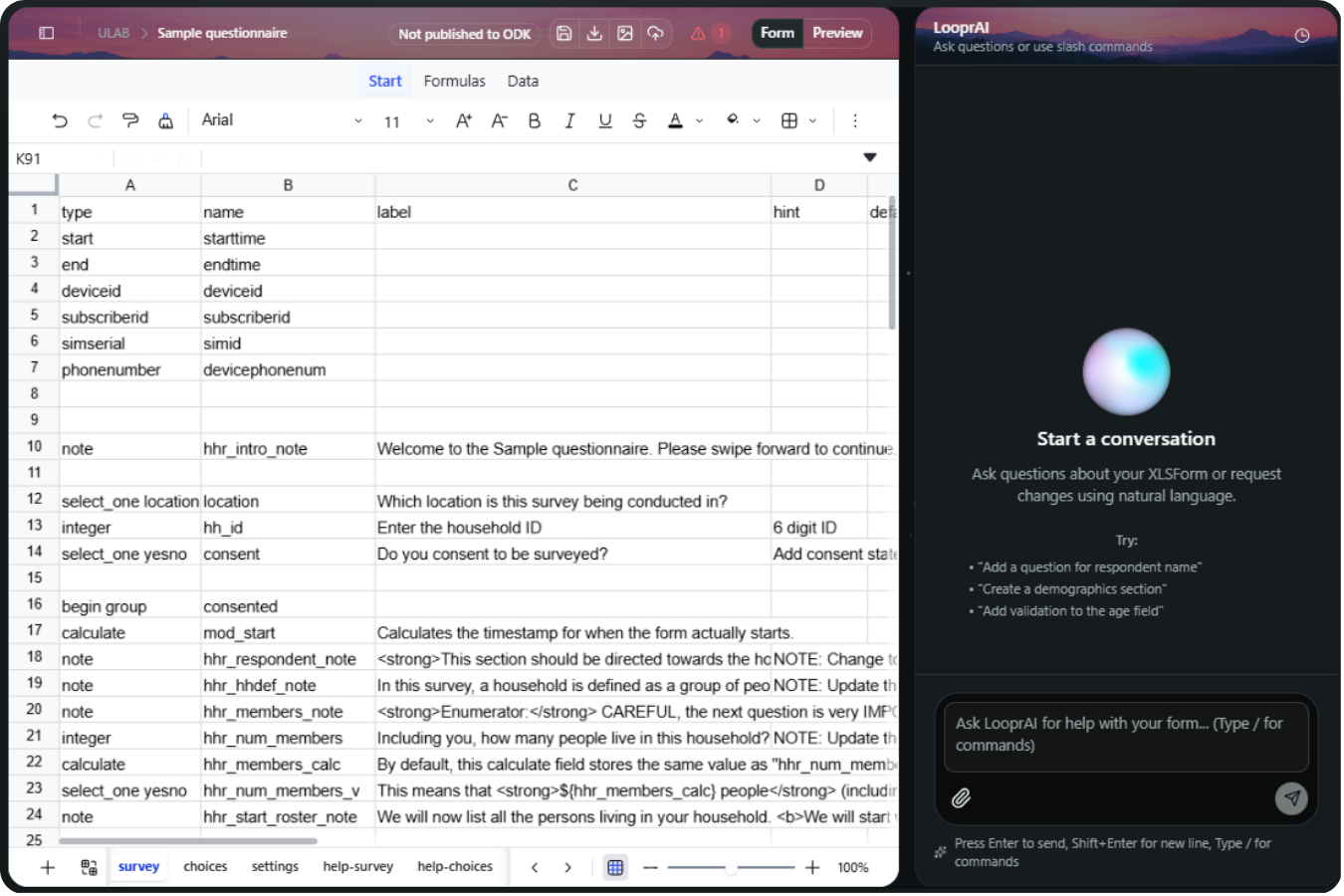
You build forms by talking to the AI in plain English — "add a consent question at the start," "make age required" — or with slash commands like /fix, /translate, and /revert. This is the chat input you'll use:
Commands
/fixFix validation errors in your form/translateManage multi-language forms (add/remove/validate translations)/suggestGet AI suggestions for improving your form/revertRevert the latest LooprAI workbook change or a specific revision
Ask LooprAI for help with your form… (Type / for commands)
Attach a questionnaire for LooprAI to convert or reference. Only PDF, Word (.doc/.docx), and Excel (.xls/.xlsx) files are accepted — other file types are rejected automatically.
Type / to open the command menu. Selecting a command inserts it into the input so you can add details before sending.
For the complete walkthrough — every top-bar button, slash commands, fixing validation errors, and publishing — see Using the LooprAI Workspace.
DataSnap
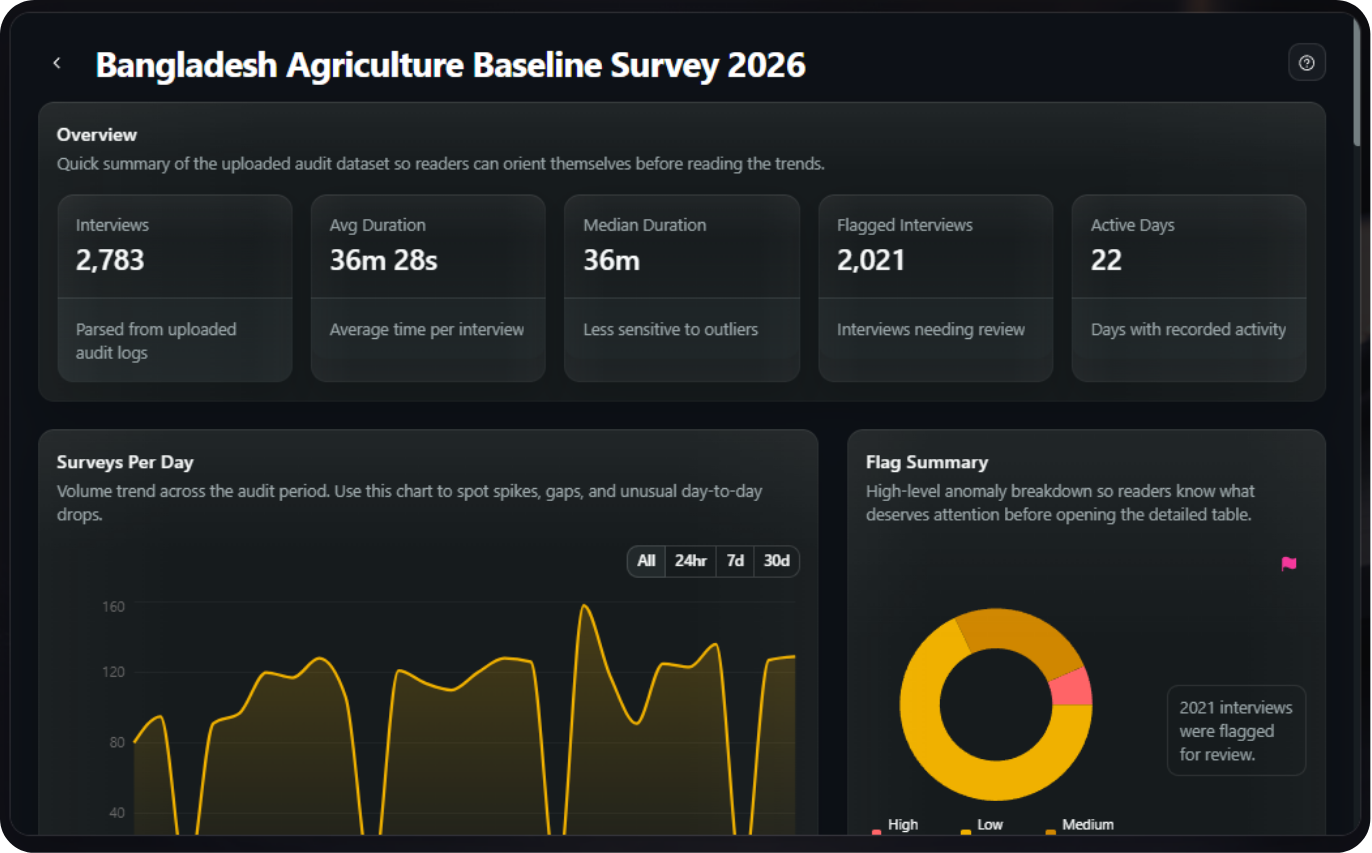
Connect a form from your SurveyLoopr server or upload an ODK form audit log CSV file to get an automatic data quality report. DataSnap maps GPS coordinates, visualizes interview timelines, analyzes audit log data, and lets you share reports with stakeholders via a public link. Learn more about ODK audit logs in the ODK form audit log documentation.
Learn more in Creating a DataSnap Report and How to Analyze Audit Log Data.
Step 4: Connect the tools
The typical workflow looks like this:
- Design your form in LooprAI Workspace → export the XLSForm
- Upload the XLSForm to your ODK server → deploy to field teams
- Connect your SurveyLoopr-hosted form to DataSnap, or export the form audit log CSV from ODK Central
- Analyze in DataSnap → share the quality report
SurveyLoopr also supports live sync between your ODK server and DataSnap — no manual CSV export needed. See the DataSnap guide for details.
Getting a form onto your server is a guided 5-step flow inside the workspace. Click through the steps below to see what to expect:
Publish Form to ODK
Follow the steps to publish your XLSForm workbook to an ODK Central server.
Select Server
Choose the ODK server to publish this form to
https://mehrab.surveyloopr.com
What's next?
Now that you understand the platform, the most important next step is deploying your first server.
Next: Getting a Server →Frequently Asked Questions
How long does it take to set up SurveyLoopr?
SurveyLoopr account creation takes under 5 minutes including email confirmation. ODK server deployment typically takes about 2–5 minutes, but image availability and DNS can take longer. SSL certificate provisioning and DNS configuration are automated, and full onboarding time varies.
Do I need Linux knowledge to use SurveyLoopr?
SurveyLoopr eliminates all Linux server administration requirements. The platform handles ODK Central installation, SSL certificates, DNS management, and server updates automatically. Users deploy production-ready servers through a web interface without command-line access.
What are the three core tools in SurveyLoopr?
SurveyLoopr provides three integrated products: managed ODK Central servers for data collection, LooprAI workspace for AI-powered XLSForm design without coding, and DataSnap for automated data quality analysis and reporting. All tools integrate through a single dashboard.
Is SurveyLoopr free to use?
The LooprAI Workspace is free forever: one project, one form, one DataSnap report, and LooprAI with fair usage. No credit card required. ODK Central servers are a separate paid product starting at $79/month. LooprAI Pro (unlimited workspaces, forms, and reports) is $49/month.
What URL does my ODK server get?
Every SurveyLoopr server gets a dedicated subdomain in the format yourserver.surveyloopr.com with a free SSL certificate included. The subdomain name is chosen when you create the server.
No Credit Card Required
Build the form first. Add hosting when you need it.
Start free with LooprAI, then deploy a managed ODK Central server or run DataSnap checks when your project is ready.
Automation handles the mechanical work.
Researchers decide what the evidence means.