Free
$0
12-question document-import preview. No credit card required.
Build an XLSForm free
PDF to XLSForm converter
Conversion is only the first step. LooprAI reads a PDF questionnaire and builds an editable XLSForm workbook for ODK, attempting to map questions, choices, sections, and skip instructions. Review every field, validate and preview the form, then download XLSX or publish to a SurveyLoopr-hosted server. The free plan previews the first 12 questions.
Verified July 18, 2026
No credit card required. Free imports preview the first 12 questions.
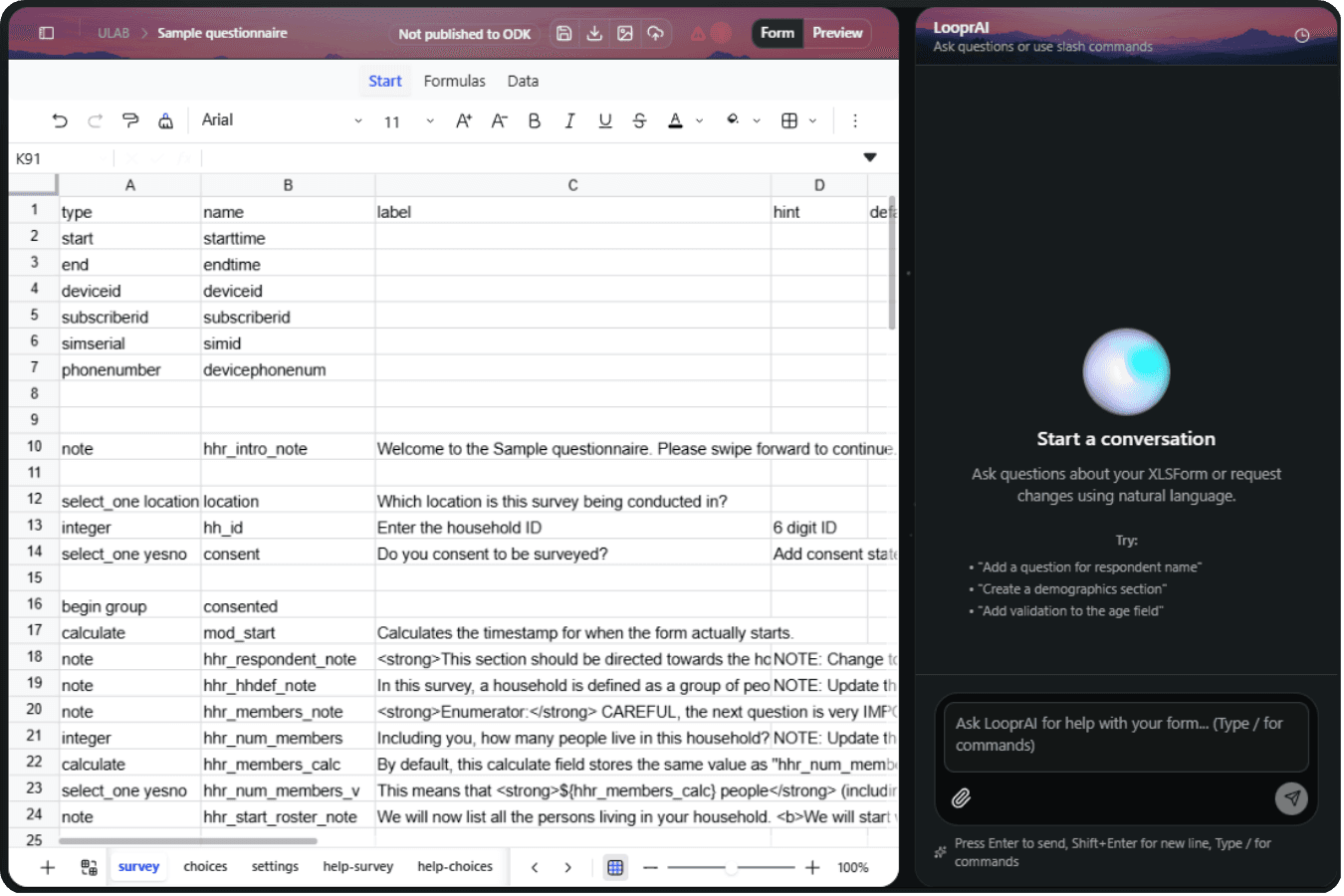
Editable draft, human review
It attempts question and type extraction, response-choice mapping, section grouping, and skip-instruction interpretation.
It builds an editable draft; it does not promise perfect preservation, field readiness, or correct methodology.
Conversion workflow
Upload the questionnaire to the authenticated LooprAI workspace.
Review the generated questions, choices, sections, and inferred instructions.
Run ODK validation, preview the form, and resolve issues you find.
Download XLSX or publish to a SurveyLoopr-hosted ODK Central server.
Human review required
Review the original source alongside the editable workbook, then validate and submit a test record before fieldwork.
Source-file boundaries
Free and Pro
Free
12-question document-import preview. No credit card required.
Build an XLSForm freeWorkspace Pro
or $529/year
Removes the free-tier document-import caps for teams that need a larger conversion workflow.
Upgrade to Workspace ProFAQs
An XLSForm is an Excel workbook that describes an ODK form using survey, choices, and settings sheets. LooprAI builds an editable draft workbook, but your team should review its structure, wording, logic, and field behavior before using it.
Verified July 18, 2026
Yes. LooprAI accepts PDFs in its workspace import flow and attempts to build an editable XLSForm draft from detected questions, choices, sections, and instructions. PDF layouts vary, so review the workbook, validate it, and test a submission before fieldwork.
Verified July 18, 2026
Sparse or scanned PDFs may use LooprAI's vision fallback when normal text extraction is insufficient. On the free tier, that fallback sends only the first two PDF pages, and the resulting document-import preview is limited to 12 questions.
Verified July 18, 2026
The free workspace provides a document-import preview of the first 12 questions with no credit card required. If a PDF needs vision fallback, only its first two pages are included. Upgrade only when your team needs the free-tier import caps removed.
Verified July 18, 2026
LooprAI attempts to interpret questionnaire structure, choices, sections, and skip instructions, but source layouts and image quality vary. It does not guarantee perfect preservation or field readiness. Review every generated field, validate the workbook, and test representative submissions yourself.
Verified July 18, 2026
Yes. The output is an editable XLSForm workbook in the LooprAI workspace. You can adjust cells directly or ask for revisions, then run validation and preview again. Human review remains necessary for question wording, logic, translations, calculations, and constraints.
Verified July 18, 2026
LooprAI attempts to interpret written skip instructions and build editable relevance logic, especially when the source states conditions clearly. Ambiguous instructions require human review. Compare each generated rule with the original questionnaire, then test all paths using representative form submissions.
Verified July 18, 2026
LooprAI attempts to map detected response choices into XLSForm choice lists and question references. Formatting, tables, and images can make extraction ambiguous. Review option labels and stored values carefully, including select-one and select-multiple lists, before validation or field deployment.
Verified July 18, 2026
LooprAI can check a workbook against ODK rules and surface structural or logic errors before publishing. Validation helps find syntax and reference problems, but it does not validate research methodology, translations, safeguarding, wording quality, or real field behavior.
Verified July 18, 2026
No. A converted workbook is an editable draft, not a guaranteed field-ready form. Your team must review all content and logic, validate it, preview the mobile flow, and submit representative test records before giving the questionnaire to field teams.
Verified July 18, 2026
Yes. After review, you can download the editable workbook as XLSX for manual upload to another compatible platform. Test the downloaded XLSForm in the destination environment because support for particular XLSForm features and workflows can differ between platforms.
Verified July 18, 2026
LooprAI creates an editable XLSForm workbook that you can download for manual upload to compatible platforms such as ODK Central or KoboToolbox. Test it in the target platform first, because each platform can differ in supported features and operational workflows.
Verified July 18, 2026
Direct publishing is limited to a SurveyLoopr-hosted ODK Central server associated with your account. For another ODK Central server or KoboToolbox, download the XLSX and upload it manually. Review validation results and test the form before any publishing decision.
Verified July 18, 2026
Use clear question numbering, distinct section headings, and plainly labelled response options and skip instructions. Searchable text generally gives LooprAI more source material than low-quality scans. Remove unnecessary decoration where possible, then review every extracted result against the original PDF.
Verified July 18, 2026
PDF conversion happens through the authenticated LooprAI workspace rather than a public anonymous uploader. Use your organization's normal data-handling review before uploading sensitive instruments, and avoid treating any automated conversion as a substitute for required privacy, safeguarding, or governance controls.
Verified July 18, 2026
Ready to inspect the workbook?
Need implementation steps before you start? Read the PDF questionnaire conversion guide.
Build an XLSForm free